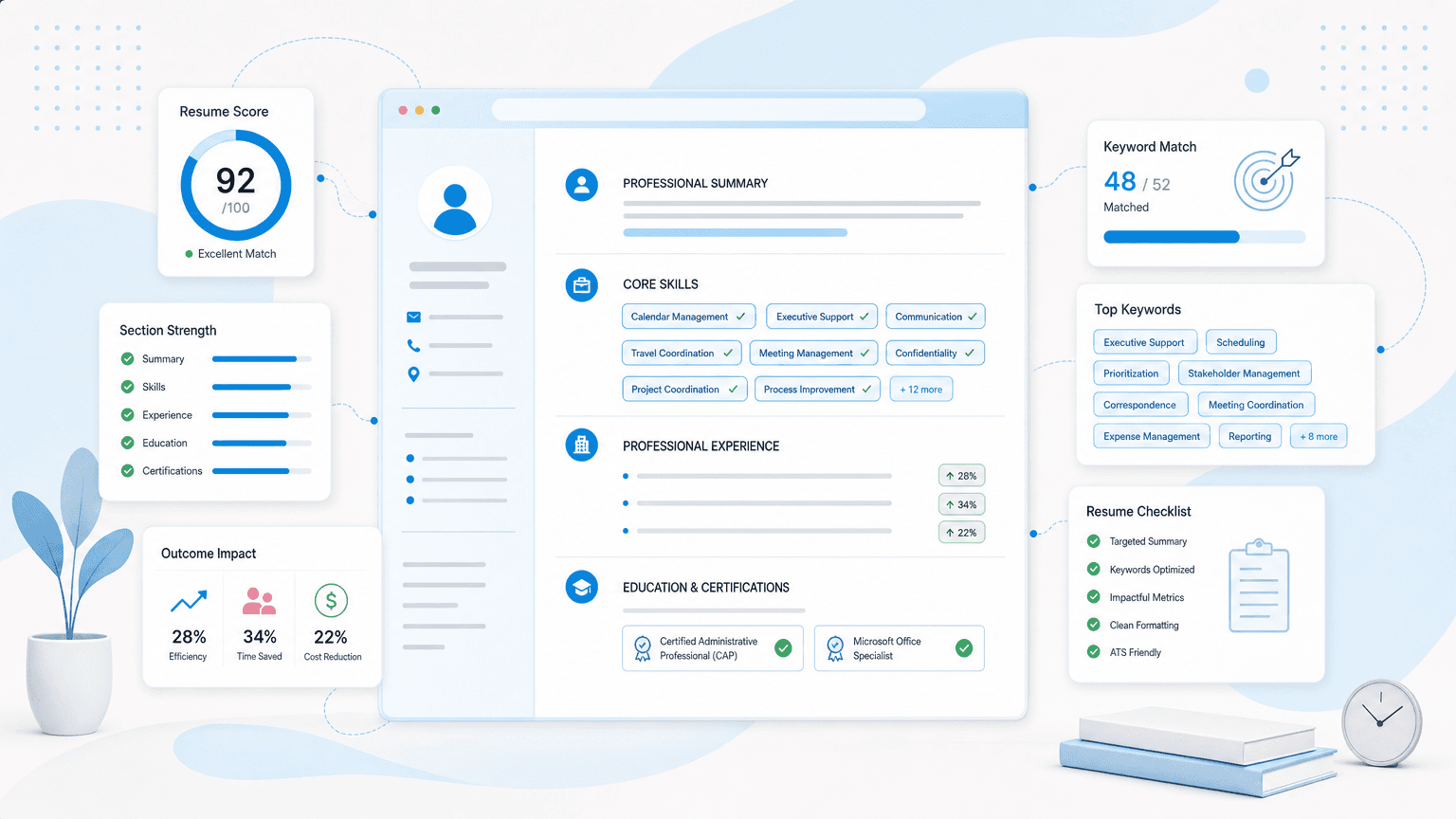
You've read three job postings for the same "Executive Assistant" title, and each one wants a different vocabulary: one wants "board liaison," another wants "SAP Concur," a third wants "multi-executive support." Picking the wrong subset, or padding your resume with all of them, is why a qualified EA still gets filtered out before a recruiter opens the file. This article gives you the complete categorized list of executive assistant resume keywords, organized by experience level and job category, so you can match your resume to what a specific posting is actually asking for. Below the keyword list, you'll find how ATS filters actually scan an EA resume, which software names matter more than the categories they belong to, and weak-versus-strong bullet rewrites for entry-level, experienced, and C-suite-support EAs.
Executive Assistant Resume Keywords: The Complete List
Recruiters and applicant tracking systems scan executive assistant resumes for a specific vocabulary, and most candidates only capture half of it. Below is the full categorized list, pulled from real job postings and EA-specific tools, not generic admin filler.
| Category | Keywords |
|---|---|
| Scheduling & Calendar Management | Complex/multi-executive calendar management, executive scheduling, multi-time-zone coordination, appointment setting and prioritization, gatekeeping, meeting coordination, agenda creation, deadline tracking, strategic prioritization of executive time |
| Travel & Logistics | Domestic and international travel coordination, multi-leg itinerary management, visa and passport processing, ground transportation arrangement, hotel/accommodation booking, travel policy compliance, travel expense reconciliation, SAP Concur / Concur Travel & Expense |
| Communication & Stakeholder Management | Executive communications, inbox and correspondence management, drafting correspondence on behalf of an executive, proofreading, stakeholder management, cross-functional collaboration, board liaison, investor relations support, VIP/client relations, diplomacy |
| Meeting & Board Support | Board meeting preparation and coordination, board minutes, agenda and briefing document preparation, presentation and deck creation (PowerPoint, Keynote, Google Slides), executive briefing materials, shareholder relations support |
| Software & Tools | Microsoft Outlook, Microsoft Office 365 (Excel, PowerPoint, Word), Google Workspace (Gmail, Calendar, Docs, Sheets), Zoom, Microsoft Teams, Slack, SAP Concur, Expensify, Salesforce, Asana, Trello, Notion, DocuSign, Adobe Acrobat |
| Financial & Budget Administration | Expense reporting and reconciliation, budget tracking, invoice processing, purchase order coordination, vendor negotiation and management, P-card/corporate card administration, departmental budget support |
| Project & Office Coordination | Project coordination, cross-functional project support, process improvement, event and offsite planning, office management, supply/inventory management, facilities coordination, onboarding support for new hires |
| Confidentiality & Discretion | Confidentiality, discretion, handling sensitive/proprietary information, trustworthiness, professionalism under pressure, confidential project support (M&A, executive compensation, restructuring), non-disclosure awareness |
| Executive-Level / C-Suite Terms | C-suite support, CEO/CFO/COO support, executive decision support, board of directors liaison, executive presence, strategic partner to the executive, chief-of-staff-adjacent duties, multi-executive support |
| Soft Skills | Proactivity and anticipatory thinking, resourcefulness, adaptability, attention to detail, emotional intelligence, problem-solving, grace under pressure, sound judgment, initiative |
| Certifications | CAP (Certified Administrative Professional, IAAP), PACE (Professional Administrative Certification of Excellence, ASAP), Microsoft Office Specialist (MOS), notary public, project management fundamentals/PMP |
This list covers the full range of the profession, from entry-level admin support to C-suite partnership. Nobody should use all 80-plus of these terms on one resume. A coordinator moving into a first EA role has no business claiming "board liaison" or "M&A confidential project support," and a senior EA already fluent in Concur and board minutes gains nothing from listing "appointment setting" as a headline skill.
The right approach is to pull the job posting for the specific role, match its language against this list, and prioritize the categories where your actual experience overlaps. The next sections break these keywords down by experience level and show exactly how to turn them into resume bullets that pass both the ATS scan and the recruiter's second look.
Why Executive Assistant Keywords Get Screened Before a Human Ever Sees Them
How ATS Filters and Recruiters Scan an EA Resume in Under 10 Seconds
Before a hiring manager ever reads your resume, software does. An estimated 99% of Fortune 500 companies and 75% of large employers use an ATS to screen resumes, and up to 80% of applications are eliminated automatically before a human sees them. For an EA role, that filter is often searching for exact-match terms: "calendar management," "travel coordination," "board meeting support," "C-suite," "confidential."
If your resume clears that first pass, the human review isn't much longer. Recruiters spend 3 to 7 seconds on a resume that makes it through. In that window, they're not reading your job description bullet by bullet. They're pattern-matching for the same handful of signals the ATS just scored: title, scope (how senior the exec was), and a couple of phrases that suggest you've handled complexity before.
The Underlying Traits Recruiters Are Actually Screening For
Here's what most keyword lists miss: nobody is hiring you for the word "discretion." They're hiring you because you can be trusted with a CEO's calendar, an unreleased reorg announcement, or a personal family matter that can't leak. The keyword is shorthand for a trait, not the trait itself.
Every category in an EA keyword list maps back to one of a few underlying questions. Can this person exercise judgment without checking in constantly? Can they anticipate a problem before the exec even sees it coming? Can they gatekeep a calendar without alienating the people being gated? Can they be trusted with information that would matter if it got out?
A bare keyword doesn't answer any of that. "Discretion" on a resume proves nothing on its own. What proves it is the sentence built around it, which is exactly what the next sections cover.
Executive Assistant Keywords by Experience Level
Not every keyword belongs on every resume. Claiming "board liaison" with two years of admin experience does the opposite of what a keyword is supposed to do: it flags a mismatch instead of a match. Match your keyword tier to what you can actually back up in an interview.
Entry-Level / Career-Changer EA Keywords
An entry-level or career-changer resume needs to prove transferable admin competence, not executive-tier fluency you haven't built yet. Lean on foundational terms that show you can run the operational core of the job:
- Calendar management
- Travel coordination
- Meeting coordination
- Correspondence management
- Office coordination
- Microsoft Office (Word, Excel, PowerPoint)
If you're moving over from an office manager, coordinator, or admin assistant role, these terms map directly onto what you already did, just under a different job title.
Experienced EA Keywords (Senior / Lead)
At 3-8+ years, the resume needs to show you can operate with less oversight and juggle more moving parts. Add complexity terms on top of the foundational set:
- Multi-executive support
- Budget tracking and expense reconciliation
- Vendor management and negotiation
- Cross-functional collaboration
- Process improvement
- SAP Concur / expense systems
- Project coordination
These signal you've handled ambiguity and competing priorities, not just a single executive's static calendar.
C-Suite / Executive-Level EA Keywords
C-suite-support resumes need the full executive-tier vocabulary, and each term should be backed by a specific project or outcome, not just listed:
- Board meeting support and board minutes
- Investor relations support
- Executive presence
- Confidential / M&A project support
- Chief-of-staff-adjacent duties
- Strategic partner to the executive
This tier carries the most risk of overreach. A first-time EA claiming board liaison duties or confidential M&A support reads as inflated to both an ATS keyword match and the recruiter who reads the bullet underneath it. If you haven't done it, don't claim it: build toward it with the experienced-tier keywords first, and let the C-suite vocabulary follow the actual work.
Software and Tools Recruiters Actually Search For
Recruiters and ATS filters don't reward category knowledge. They reward exact tool names. "Scheduling software" tells no one anything. "Outlook" tells a recruiter you can start managing a chaotic exec calendar on day one.
Weak:
Skills: Microsoft Office, scheduling software, expense tools.
Strong:
Managed CEO's calendar across 4 time zones in Outlook; processed 20+ monthly expense reports through SAP Concur with zero audit flags.
The strong version matches the literal keyword an ATS is scanning for, and it gives a recruiter a concrete outcome to picture. Same skill, radically different signal.
Specificity also means retiring terms that no longer describe current EA work. "Microsoft Access" as a bare skill listing reads like a leftover from a 2012 resume; drop it unless you're actively building databases in it. "Diary Management" shows up often in UK job postings, but it sounds dated and vague to US recruiters next to sharper phrasing like "board meeting coordination" or "cross-functional calendar management."
Name the actual tool in every bullet. Swap "communication tools" for "Slack" or "Teams." A recruiter scanning for "project management software" will skim right past that phrase, but "Asana" and "Notion" register immediately as exact matches. And when a bullet mentions "document tools," name what you actually used: "DocuSign" or "Adobe Acrobat." Each swap costs nothing and buys you an exact-match keyword hit.
Generic terms feel safe because they're broad enough to apply anywhere. That's exactly why they get ignored: ATS keyword scans are built to reward precision, not coverage.
Certifications Worth Listing: CAP, PACE, and Beyond
CAP (Certified Administrative Professional, IAAP) and PACE (Professional Administrative Certification of Excellence, ASAP) both test a defined body of EA competency: project coordination, communications, technology, and organizational skills, verified through an exam rather than a certificate of attendance. Recruiters searching applicant tracking systems for "CAP" or "PACE" will surface certified candidates over uncertified ones with similar experience, because the credential itself is a keyword.
Neither certification is a gating requirement. No employer will reject a resume for lacking one the way a nursing license gates a clinical role. But at the margin, between two candidates with comparable tenure, a certification is a tiebreaker, and it fills a real gap: most EA resumes list software and duties but skip credentials entirely, so the ones that do include them stand out in a search.
Microsoft Office Specialist (MOS) is worth a line if held, though it carries less weight than CAP or PACE. For EAs moving toward chief-of-staff-track roles, PMP or basic project management coursework signals readiness for that shift.
List certifications on their own line, labeled "Certifications," not folded into a Skills section where scanners may miss them.
Weak vs. Strong Bullet Examples by Experience Level
The quantified figures in the examples below (percentages, headcounts, trip counts, meeting sizes) are illustrative placeholders. Replace them with your own documented numbers before adding any bullet to a resume.
Entry-Level / No Formal EA Title
Weak:
"Helped manage office tasks and schedules for the team."
Strong:
"Coordinated daily schedules, meeting logistics, and vendor communications for a 12-person office, reducing scheduling conflicts by roughly 30% after introducing a shared calendar system."
The weak version reads like a filler line on any admin resume. The strong version describes the same underlying work (scheduling, coordination, process improvement) in language that maps directly to entry-level EA keywords like calendar management and cross-functional coordination. Naming the scale (12-person office) and the result (fewer conflicts) turns a vague duty into evidence of impact, even without an "Executive Assistant" title in the job history.
Experienced EA Supporting a Single Executive
Weak:
"Managed executive's calendar and travel."
Strong:
"Managed complex calendar and international travel for a VP overseeing three regional offices, coordinating logistics across four time zones and booking an average of 15+ trips per quarter with zero missed connections over two years."
Anyone can write "managed calendar and travel." The strong version proves the claim by adding scope (three regional offices, four time zones), volume (15+ trips per quarter), and a reliability outcome (zero missed connections). That combination signals the judgment and stakes-handling that separates a single-executive EA from an office coordinator, which is exactly the trust trait a hiring manager is screening for at this level.
Senior EA / C-Suite Support
Weak:
"Supported senior leadership with various tasks."
Strong:
"Provided board meeting support and confidential project coordination for the CEO and CFO, managing investor relations correspondence and preparing materials for quarterly board meetings attended by 8 board members and outside counsel."
"Various tasks" tells a recruiter nothing and actively signals a lack of seniority. The rewrite names the exact keywords senior search committees look for: board meeting support, confidential project support, investor relations support, and multi-executive support. The concrete detail (quarterly board meetings, 8 board members, outside counsel) shows this person operates at a level where discretion and polish carry real business consequences.
The three resumes below show what these bullets look like assembled into complete, submittable documents at each stage of the EA ladder.
Executive Assistant Resume Examples: Entry-Level to C-Suite Support
The real axis on an EA resume isn't years of tenure, it's the seniority of the executive you support and how many of them you support at once. The three examples below map to that axis: an entry-level EA supporting a single director, a senior EA extending support across a VP and their directors, and an EA operating at C-suite/board level. Match the one closest to who you actually support, then borrow its structure, not its numbers.
Executive Assistant Resume
This is the entry-level template for an EA supporting a single director, built from a career path that started in general office coordination rather than a formal EA title. The summary leads with the promotion story (Office Coordinator to Executive Assistant) instead of years of tenure, because that trajectory is the strongest signal available at this stage. Every bullet stays inside the entry-level keyword set covered earlier, calendar management, travel coordination, correspondence management, rather than reaching for C-suite vocabulary the candidate hasn't earned yet.
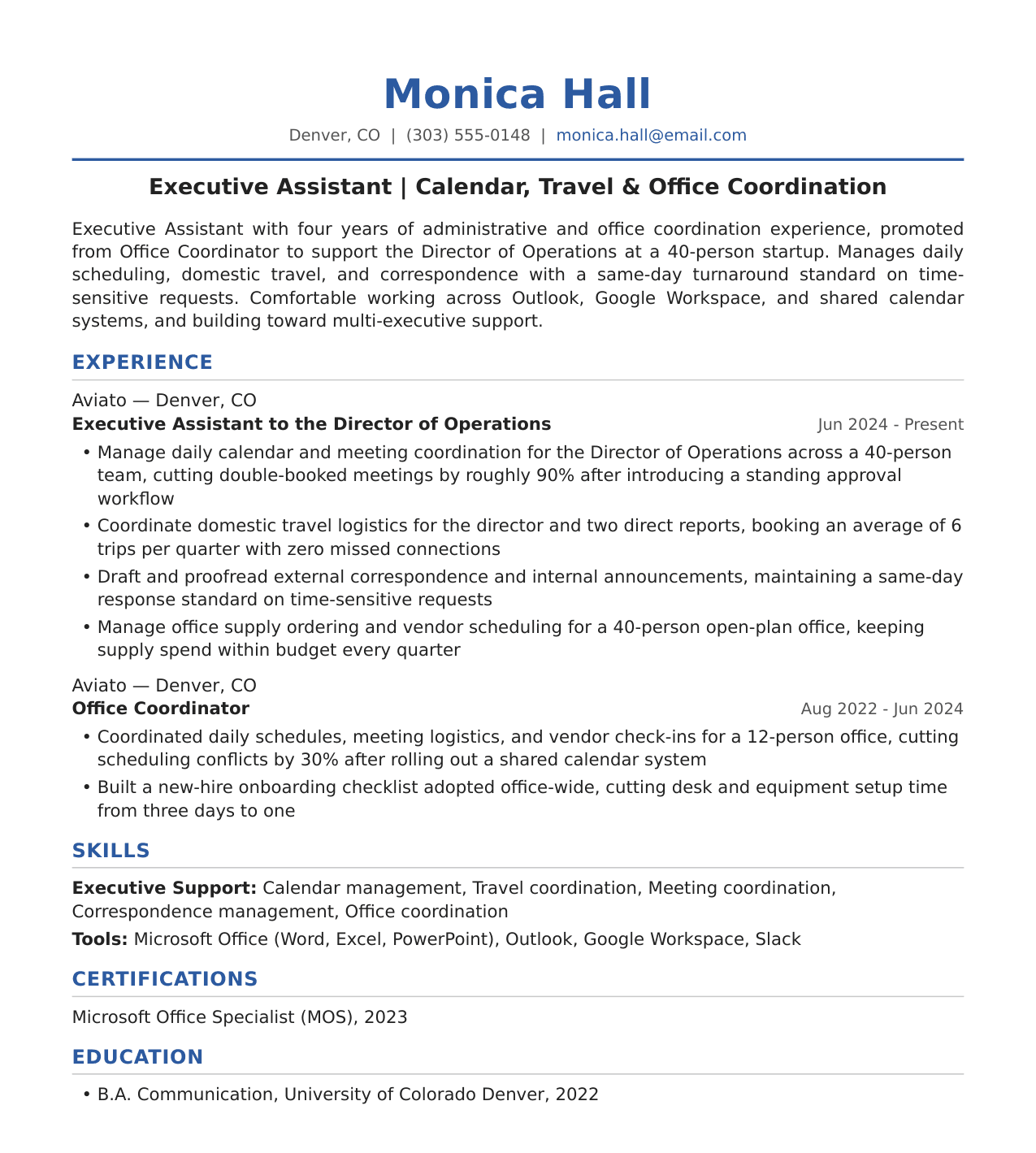
What's working here: the double-booking and trip-count numbers give scope to an otherwise ordinary calendar-management bullet, the Office Coordinator role stays on the resume to show progression instead of getting cut, and the certification line adds Microsoft Office Specialist rather than reaching for CAP or PACE before the experience supports it.
Senior Executive Assistant Resume
This is the template for an EA who has moved from single-executive support to multi-executive support, the defining shift at the experienced tier. The summary opens with the VP relationship and the multi-time-zone scope, then closes with the detail that carries the most weight for this level: absorbing two more executives' support needs without an added headcount. The experience section carries a SAP Concur-specific bullet with a volume and audit-outcome pair, following this guide's rule that the tool name matters more than the category it belongs to.
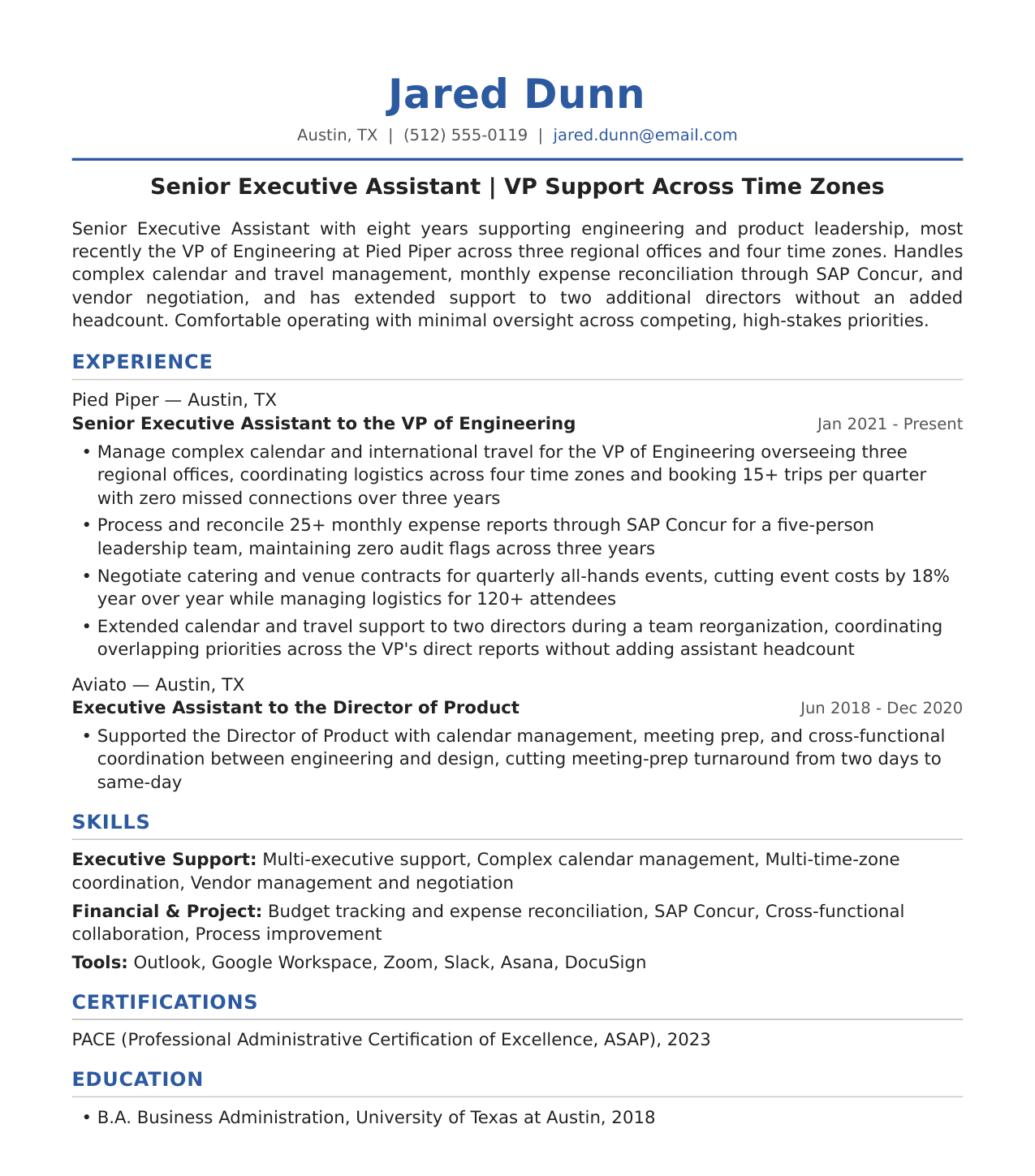
What's working here: "extended support to two directors without adding assistant headcount" is the single line that separates a senior EA from an entry-level one, the PACE certification gets its own line instead of being buried in Skills, and the vendor-negotiation bullet pairs a cost outcome with an attendee count instead of leaving "negotiated vendor contracts" unquantified.
Executive Assistant to the CEO Resume
This is the C-suite-support template, and it carries the most risk of overreach if the scope isn't real, so every claim is tied to a specific board size, deal value, or touchpoint count rather than a vague "supported senior leadership" line. The summary states the board size, the funding-round context, and the acquisition dollar value up front, then the experience section shows an earlier senior-EA role underneath it to establish that this candidate built up to C-suite support rather than landing there without the track record.
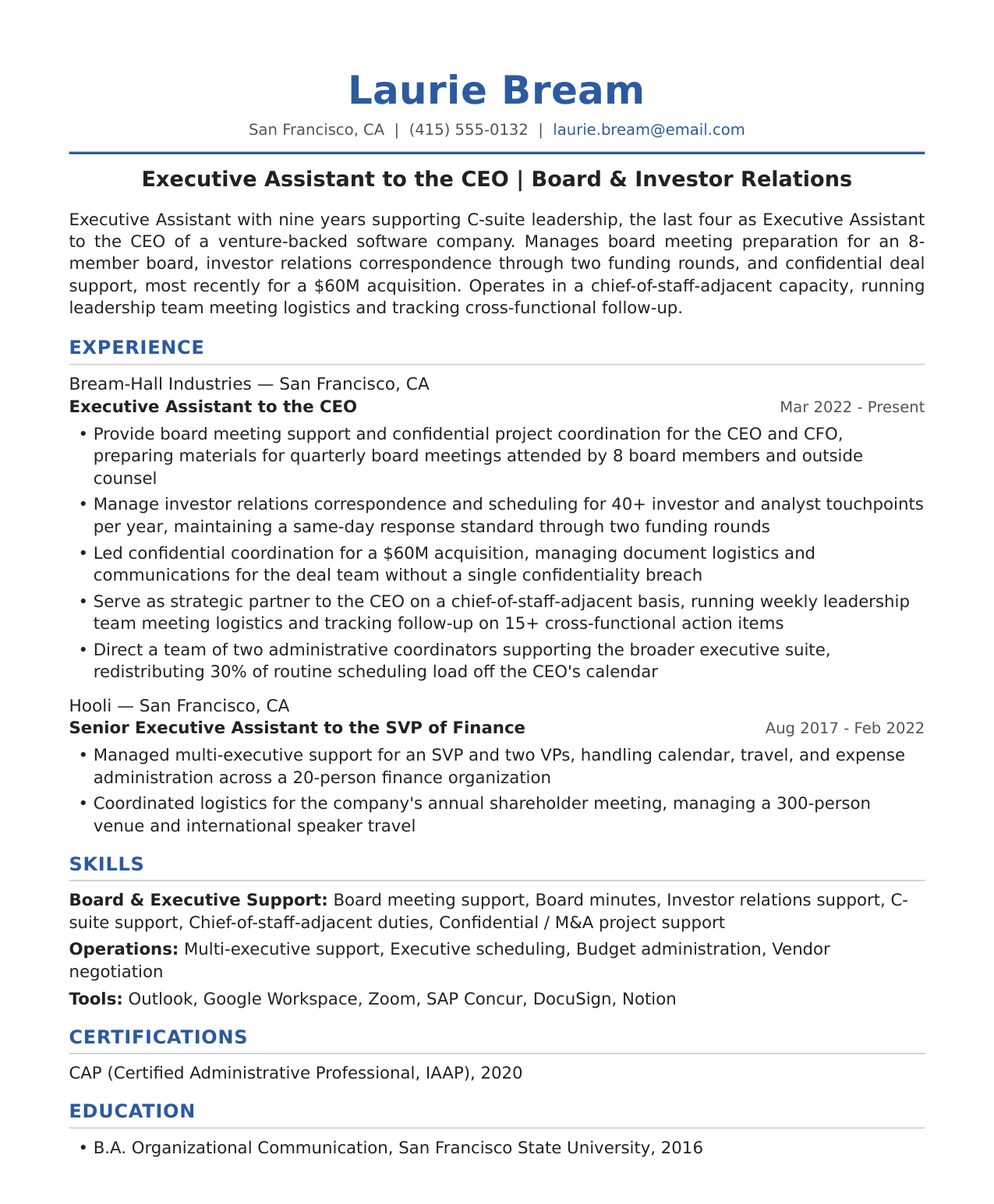
What's working here: the chief-of-staff-adjacent bullet quantifies the action-item volume instead of just claiming the title-adjacent duty, the CAP certification sits on its own line where a board-focused search can find it, and the confidential-M&A bullet states the deal value and the zero-breach outcome together, which is exactly the pairing this guide's confidentiality section says a bare "discretion" listing can't prove on its own.
Across all three, notice what stays constant: a named executive level, a named tool, and a number attached to the outcome. If your actual scope sits between two of these, for example a director-level EA who already handles a second executive's overflow, borrow the senior template's structure and keep the numbers to what you can back up in an interview.
Placement, Formatting, and Common Mistakes
Where Each Keyword Type Belongs
Not every keyword deserves the same real estate. The Summary or Profile line at the top should hold only your 2-3 strongest, most defensible trait keywords, the ones you can back up in the first sentence of any interview. A Skills or Certifications section is for scanability: named tools, certifications, and languages that a recruiter or ATS can confirm in a glance. Experience bullets are where keywords earn the most weight, because they are embedded with a verb and a result. A Skills list confirms exposure. A bullet proves impact. If a keyword only appears in your Skills section and never shows up doing work in a bullet, it reads as unproven.
Formatting Conventions for EA Resumes
One page is the norm for early- and mid-career EA resumes. Two pages become defensible once you have extensive, multi-organization C-suite support tenure that genuinely needs the space to document, so don't force a 15-year career onto one crowded page just to hit a rule of thumb. Keep the layout ATS-safe: no tables, graphics, text boxes, or headers/footers, since EA resumes are frequently uploaded to portals that misparse decorative formatting and drop content entirely. Use reverse-chronological order and keep tense consistent, past tense for past roles, present tense only for your current one.
Common Mistakes Recap
- Listing trait words (proactive, discreet, polished) with no bullet proving them
- Claiming a keyword tier (Chief of Staff-level, board-facing) not yet earned by your experience
- Naming generic tool categories ("calendar software") instead of the actual product
- Keyword-stuffing a bullet without a verb or result attached
- Skipping certifications that would otherwise confirm a skill instantly
- Using tables, columns, or graphics that break ATS parsing
- Stretching a one-page resume to two pages without the multi-organization tenure to justify it
How Upplai Finds the Executive Assistant Keywords Your Resume Is Missing
Everything above works better when you are not doing it by hand. Upplai's ATS Resume Checker takes the job description you are applying to and breaks it into work experience, hard skills, soft skills, education, and nice-to-haves, then checks your resume against each category. Instead of a pass/fail badge, it shows missing keywords with context, so you see that the posting wants "vendor contract negotiation" and your resume only says "vendor management," not just a red X.
The checker gives you two scores at once: an ATS score for whether the parsing systems will surface your resume, and a recruiter/match score for how a human reader would rate the fit. Both update as you edit, so you can adjust a bullet, watch the score move, and know immediately whether the change helped.
Once you know what's missing, the AI Resume Optimizer handles the rewrite. It tailors your resume content, structure, formatting, and keywords to the specific posting, and explains every change in plain language: why a phrase moved, why a bullet was reworded, why a skill got added. You accept or reject each suggestion one at a time. Nothing gets inserted without your approval, and the tool does not invent scope you never had. That matters for EA resumes especially. You should never claim you managed a $2M budget or held board-level confidentiality clearance if you didn't. Upplai surfaces the gap and lets you decide how to close it truthfully, whether that's a different bullet, a different keyword, or a different job to target.
Tailored resumes built this way produce 6X more interviews than generic ones sent to every posting. The checker is free to try, no credit card required, so you can see your gaps before you decide what to do about them.
Executive assistant resume keywords only work when they're tied to real scope: a specific executive, a specific tool, a specific outcome. Pull the categorized list above, match it against the job posting in front of you, and only claim the tier you can back up in an interview. The keyword gets you past the filter; the bullet underneath it is what gets you the callback.
Check your resume against the job description
See exactly which executive assistant keywords your resume is missing, with a dual ATS and recruiter score, in under ten seconds.